Choose resume templates for Gulf job applications. Compare the layouts below, open a design in the editor and add your own experience, skills and qualifications.

Gulf Career Group · Resume guidance

Resume templates that put
your experience first.

Explore resume templates that help a recruiter find the facts that matter. Use this guide to choose a format, organise your information and prepare a clear CV for applications in Qatar, the UAE, Saudi Arabia and across the Gulf.

Start with the vacancy instructions. Then choose the resume template that gives your relevant work, qualifications and skills enough space. The advice below explains the decisions behind a useful CV, so you can create a document that reflects your own background.

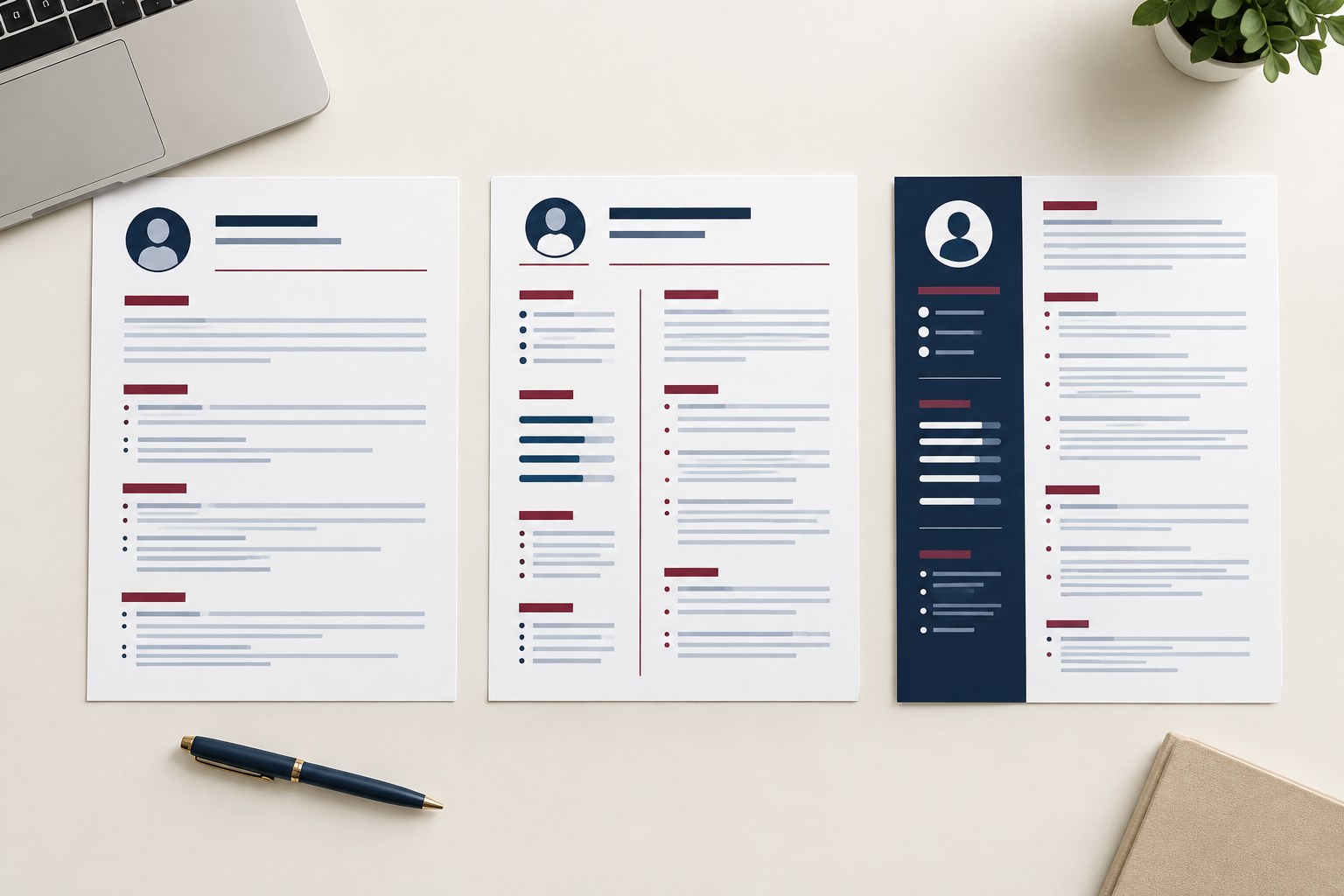
Resume templates with single-column and two-column CV layouts for Gulf job applications
Illustrative CV layouts. Compare the actual gallery previews before choosing your format.
01 · CHOOSE YOUR FORMAT

How to choose resume templates for Gulf jobs

Think about how the employer will receive your file and what the reader needs to see first.

Choose the layout around your information

If your recent employment is your strongest evidence, give work history the most space. A single-column format can keep job titles, dates and bullets in one reading sequence. A two-column format can separate short items, such as contact details and skills, from longer descriptions of your work.

Before committing to a design, try it with your actual draft. Check long employer names, several qualifications and any job title that wraps onto a second line. A sample may look tidy because it contains less text than your CV.

Follow the application route

When an employer specifies Word or PDF, use that file type. For a recruitment portal, a simple text-focused layout is a sensible starting point. Keep standard headings such as Work Experience, Education and Skills, so the structure remains easy to understand.

If you are emailing a recruiter, also consider how the attachment will look on a small screen. Avoid tiny text and overly narrow columns. A template can support readability, but it cannot guarantee that every applicant tracking system will interpret the file correctly.

Compare resume templates by layout and purpose

Use the gallery’s Style and Layout filters to narrow your choices. For a work history with detailed responsibilities, start by comparing single-column layouts. If your skills and qualifications are short enough for a sidebar, try a two-column option and check that the main employment section still has sufficient width.

For an administrator, compare how each preview displays dates, software skills and contact details. Technicians can check the space for equipment experience and certificates. Graduates can look for a layout that gives education and projects a clear position. Template names are browsing labels; assess the actual preview rather than assuming that an “Executive” design is required for senior roles or that an “ATS” label guarantees successful parsing.

Use colour in resume templates with a clear purpose

A small accent on headings can help separate sections. However, the employment dates, email address and main text should remain easy to read in black and white. Avoid placing essential information on a background that makes it difficult to print.

For Gulf applications, clarity matters more than matching a country’s flag or an employer’s logo. Use one accent consistently and let your qualifications carry the message. The page design is a browsing aid; your exported CV needs its own final check.

02 · BUILD A CLEAR STRUCTURE

Organise your information in resume templates

Include the information a recruiter needs to assess your application, then remove details that distract from it.

Contact details and professional profile

Use your full name, a working email address and a phone number with its country code. State your current city and country so a recruiter can distinguish a local applicant from someone applying from abroad. If the vacancy asks about availability, add a short, accurate statement such as “Based in Doha; available after a 30-day notice period” or “Based in Kochi; open to relocation to Qatar”. These are illustrative examples: use your own location and realistic joining date. Include a LinkedIn or portfolio link only when it supports your application.

Below the contact block, a short profile can connect your background to the role. Describe your occupation, relevant experience and a small number of strengths you can demonstrate. You do not need a long personal statement or a promise about what you will achieve.

Work history and qualifications

List recent relevant work first. For each role, give the employer, job title, location where useful, and employment dates. Then explain the duties or results that help the reader understand your experience. Use a consistent date format throughout the document.

For education, include the qualification, institution and completion year. If a course is in progress, make that status clear. Add licences or technical certificates when they relate to the vacancy, including the issuer or expiry information where it helps the employer assess the requirement.

Skills, projects and additional sections

Group skills around the work you can perform. A driver might list the vehicle types operated, daily vehicle checks and delivery records. A technician could name fault diagnosis, preventive maintenance and equipment used. An administrator could include purchase-order tracking, filing and Excel reporting. Specify the licence category, tools or systems where relevant, rather than filling the section with broad phrases such as “hardworking” or “team player”.

Projects, volunteering and practical training can provide evidence that does not fit under paid employment. Keep these sections clearly labelled. References, hobbies and personal details are optional additions, rather than space that every CV needs to fill.

Make the reading order consistent

Keep job entries consistent across resume templates. For example, place the job title and employer before the dates, then add a short group of bullets. Keep heading sizes and spacing consistent so the reader can recognise the pattern quickly.

Check the template’s preview from top to bottom. Your strongest evidence should be easy to locate without searching between columns. If a supporting section becomes longer than your work history, review whether every item in it is useful for this application.
03 · MATCH YOUR CAREER STAGE

Resume templates for your career stage

The right amount of detail depends on the vacancy and the evidence you can provide.

For students and first-time applicants

If you have little paid experience, start with relevant education, practical assignments, internships or volunteering. Describe what you personally contributed. For example, a business graduate applying for an office role could write: “Prepared an Excel expense tracker for a course project, grouped costs by category and presented the monthly totals.” A technical graduate could describe a supervised workshop task and the tools used. Label these entries as academic projects or training so the reader understands their context.

Keep the distinction between study and employment clear. A one-page draft may be enough when your experience is limited, but do not reduce the font size to force everything into it. It is better to remove unrelated material than to make the useful information hard to read.

For experienced applicants and career changes

Give the most detail to roles that support your current target. Older positions can be shorter if they add little new evidence. Two pages may be useful for a longer career, provided the second page contains relevant information rather than repeated duties.

When changing fields, connect transferable skills to specific examples. An operations coordinator moving into administration could explain scheduling, document control or communication tasks. Keep your original job titles and dates accurate; use the profile to explain the direction of your application.

04 · WRITE WITH EVIDENCE

Write clear content for your resume templates

Clear examples help a recruiter understand your work more quickly than broad claims.

Write a profile with a clear focus

A useful profile answers three questions: what kind of work do you do, what relevant background do you have, and what can you contribute? Keep it to a few sentences. Name the tools, responsibilities or working environments that matter for the role.

For example: “Warehouse assistant with experience in stock receiving, item checks and dispatch records. Uses Excel to maintain daily logs and supports the supervisor with delivery paperwork.” Adapt the structure to your own facts; do not use a sample statement as a substitute for your history.

Explain actions before adding results

Start a work bullet with a task you handled, then add context. “Managed documentation” is less useful than “Checked delivery notes against purchase orders and filed signed copies for the accounts team.” The second version tells the reader what the work involved.

If you have a reliable measure, add it. However, a clear responsibility is better than an invented number. Do not claim savings, performance improvements or team sizes that you cannot support. Also, avoid repeating the same bullet under several different jobs.

Describe skills at an honest level

Name the software, equipment or language and give an accurate level of ability. If you use Excel for data entry and basic formulas, explain that rather than calling yourself an advanced analyst. If a licence is required, state only the category you actually hold.

Language skills are useful when a role involves customers, site teams or written records. Distinguish conversational ability from reading and writing proficiency. For example, “English: comfortable with delivery instructions and daily records” provides more context than a decorative rating bar. Choose a description you can demonstrate during the employer’s assessment.

Review AI suggestions before using them

AI assistance can help shorten a sentence or make a task description clearer. Supply accurate information first, then compare a suggestion with what you actually did. Remove any added employer, qualification, achievement or technical skill that was not part of your input.

The final draft should still sound like a description you can explain comfortably. Read it aloud and check unfamiliar terms. If a sentence sounds impressive but you cannot give an example behind it, rewrite it in simpler language.

05 · REVIEW BEFORE YOU APPLY

Review resume templates after downloading

The preview is one check. The exported file needs another.

Confirm the file type and page layout

Use the format requested by the employer. PDF is useful when you want to preserve the appearance of the page, while an editable Word file may be requested for a particular process. Neither option removes the need to inspect the result.

Open the downloaded file on your device. Look for blank pages, awkward page breaks, missing text or a heading separated from its content. Check that the text is readable at normal size. A long section may need shorter wording or a different layout.

Check text, links and private details

Copy part of the exported text into a plain text editor and check the reading order. Then test any portfolio or profile link. Recheck the email address and phone number, because a small error in either can prevent a recruiter from reaching you.

Keep passport numbers, bank details and copies of identity documents out of the CV. If the employer needs supporting documents later, use the appropriate application process. Save an editable backup separately so you can prepare a tailored copy for the next vacancy.

A final review in five steps

  1. Compare the CV with the vacancy and the requested file format.
  2. Confirm names, dates, qualifications and contact details.
  3. Read every bullet for accuracy and remove repeated wording.
  4. Open the export and check spacing, text order and page breaks.
  5. Save a clearly named application copy and an editable backup.
YOUR QUESTIONS, ANSWERED

Resume templates: common questions

A few practical points before you choose a design or submit your application.

Do I need a different CV for every Gulf vacancy?

Keep one accurate master draft for your resume templates, then adjust the emphasis for each application. You can move relevant skills higher, shorten unrelated duties and change the profile to reflect the role. Your dates, employers and qualifications should stay consistent.

Does a CV need a photograph?

Follow the employer’s instructions. If no photograph is requested, a text-focused document can keep attention on your experience. A photo is not evidence of suitability, and you do not need to add one simply because a design has space for it.

Can I import an existing resume?

You can upload a plain-text TXT file or a JSON backup created by Resume Studio. For a CV saved in Word or PDF, copy its readable text and paste it into the import area, or enter the details manually. A JSON backup restores the saved resume data; text needs to be organised into the appropriate fields. After importing, check that job titles, employers and dates are paired correctly, and remove any repeated page headers.

Can I change resume templates after writing my draft?

You can compare layouts in the editor. After switching, review long titles, lists and page breaks. The design should organise your information rather than require you to replace your own details with sample wording.

When should I add a cover letter?

Include one when the advert requests it or the application gives you a place to explain your interest. Focus on that employer and role, with a brief example of relevant experience. Avoid repeating your entire CV in paragraph form.

Is a template enough to make an application successful?

A layout helps present information, but it does not guarantee an interview or a job. The relevance and accuracy of your experience, the employer’s requirements and the application process all matter. Review the content as carefully as the design.